Light, Depth, and the Digital Field Note: My First Encounters with Luminar Neo
The Evolving Gaze
First Impressions of the Luminar Neo Ecosystem
While my roots are based in the Irish landscape, I am, like many Irish folks before me, a traveler at heart. If there is one thing that is becoming quite apparent to me of late, it is that the draw to an analogue ritual is becoming so important to how I approach the landscape and ultimately the photography I create. The real goal for me is a simple translation of the human experience of a place into a digital medium. And that is a thrill.
With all that being said, let's talk about post-production. While there are many tools at a photographer's disposal when it comes to how they bring their images to fruition, I am going to focus solely on the wonderful products of Luminar Neo. Like any post-production tool, Luminar Neo is not a replacement for someone learning how to see, but simply a way to refine the vision that you may have had when you were standing in the mud or the mist, or waist-deep in a fast-flowing river.
Transparency Note: To get the business end out of the way first, Luminar was kind enough to reach out and offer me a license key to use their product in exchange for some of my crazy ramblings about how to use it and what it's like being a first-time user of the product.
So, if you have been following along with the adventures—whether it be through Instagram or YouTube—you'll have known that I spent the last few months of last year on a grand adventure leading photography workshops, starting in Cape Town, up to Namibia, across to Botswana, down to Zimbabwe, and all the way over to Japan. In this article, we will discuss some of my favorite features so far that I have been experimenting with in Luminar Neo, editing both phone images for stories and then, of course, the main images for the YouTube videos that I have created along the way.
2. Light Depth: Carving the Atmosphere
So, one of the more recent tools that was added into the Luminar Neo arsenal was one named Light Depth. The first thing I would say is this tool is like wizardry; if you are like me and you are not too astute when it comes to complex editing in Photoshop, then this tool really helps you carve light and depth within your frames.
Let's get our hands a little dirty here: picture yourself now overlooking a grand vista. There is some cloud in the sky and the potential for it to break; you've got about 15 minutes before the sun sets and the landscape photography gods are smiling slightly favorably. But, alas, at the final moment the cloud remains too heavy and only the briefest of light kisses the landscape. Albeit somewhat flat, this is where the Light Depth tool will excel.
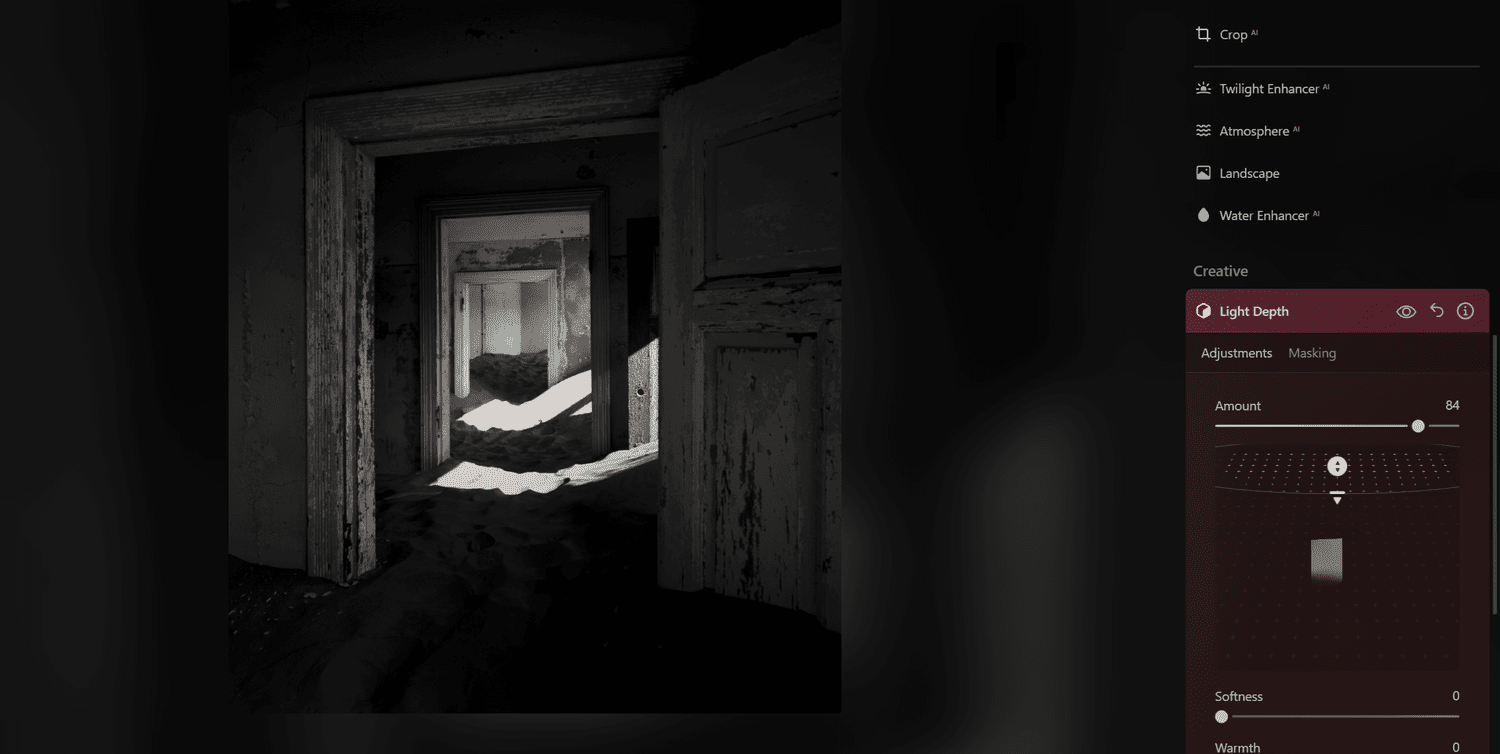
Using 3D Depth Mapping to control light locally rather than globally. In this Example I am pushing the light to the back

Using 3D Depth Mapping to control light locally rather than globally. Here the light has now been brought to the front.
In traditional editing, we are often trapped in a two-dimensional world; when you move an exposure slider, you are applying a "global" change that treats the mountain peak and the pebbles at your feet as if they exist on the same plane. Luminar Neo breaks this flat plane through its 3D Depth Mapping technology. Upon opening an image, the software’s engine calculates a Depth Map, effectively "reading" the distance of every object from your lens. This allows for local light control that feels more like studio lighting than post-processing. Using the Light Depth tool, you can independently adjust the "Near Brightness" and "Far Brightness," effectively sculpting the light around the 3D form of the landscape.
3. The Seamless Wander: The Luminar Ecosystem
So as many of you know, I am a traveler at heart. If there is one thing that I love more than photography, it is the excitement of packing my bag, getting on a bus, heading to the airport, and getting ready for a new adventure. With that being said, I often find myself very far away from my computer as I don't tend to travel with a laptop, so having the ability to edit on the go with my phone is of vital importance.
Having a robust photo editor on my phone is an absolutely key part of my workflow, particularly one such as this that enables me to sync the images from my phone and then continue editing them on my computer when I do eventually get home. Picture yourself overlooking a scene; the tripod and camera are set, and the shutter button is pressed. After retreating away from the elements, you begin to back up your images, and in my case, I will transfer some directly to my phone. This enables me to then edit as a reflection—I can still use the fresh memory of the experience to begin to craft and shape a potential final edit using the tools available to me with the Luminar Neo app.


I am particularly a fan of the film looks that they have available to choose from; if you have noticed over the last while with the stories that I post on social media, they have all begun to have a similar aesthetic, and this is due to that very fact. While I have traditionally steered away from immediately looking at my photographs after a shoot has finished, this has somewhat changed over the last short while. Having immediate access to my images has allowed me to enhance the pre-visualization that I initially have when going into a landscape.
4. Award-Winning Innovation: The Best of 2025
One of the things that I have been advocating over the course of a short while, particularly in my writings for Fstoppers, is that the digital darkroom is just as important as being in the field taking the images. Having a firm grasp and understanding of what it is you want your photographs to be and feel is paramount to growth and progression in this art form.
When the purism hat has been removed and we can look at products like Luminar Neo as tools of our trade, it only serves to foster innovation. The mobile version of Luminar Neo was voted Google Play’s Best Multi-Device App for 2025, and if you've ever read any of the reviews on the Google Play app for Luminar Neo Mobile, it's easy to see why. This validates a wonderful shift towards a more fluid, mobile-responsive workflow. The simple fact of the matter is we all most likely have our mobile phones with us in our pockets regardless of what we are doing, and this award really helps sell the idea that the app is finally being as mobile as the photographer.
5. Artistic Philosophy: AI as a Tool, Not a Crutch
Okay, so let's address the AI elephant in the room. There is simply no denying the fact that when Luminar Neo was launched, it put heavy emphasis on its AI abilities and its ability to easily and dramatically replace the skies in your photographs. While there was some initial backlash and forums were on fire with rage, we are now at a point where tools such as these have been integrated into all of the photo editing software available to photographers today.
The reality is that AI or not, photography has always and will always be about learning how to see. Using tools such as these only enables us to create visions of the world around us in a way that we want to remember it. At the end of the day, we are artists and we have every right to create art in whatever way resonates most with us—whether that be replacing the sky, 3D mapping and Light Depth adjustments, or simple contrast adjustments. It's all the same, and with the advancements now of AI integration, these steps that we would take have simply now been automated.

Focusing on evocative qualities rather than technical friction.
It's also worth noting that tools like Luminar Neo do not take the photographs for us, but they simply remove the technical friction, allowing us to focus on the evocative and atmospheric qualities that we want to enhance and bring forward. If you were to say something like this 200 years ago to a painter, they would have laughed in disbelief and perhaps relished in the idea of having part of their canvas created alongside them. It all simply boils down to creative choice, just as much as we have a choice of which filter to put on the end of our lens or indeed which lens to use in the first place.
6. Conclusion: A New Tool for the Toolkit
So for someone who is using Luminar Neo really for the first time in any substantial kind of way, I am very happy so far with how everything has gone. It's a very smooth, simple, easy workflow and if you all know me at this stage, you know that's my MO. Of course, there is a wonderful upside to using software like Luminar Neo over its main competitor, and that is cost. If you are like me and weekly and monthly budgets are a thing, then having the choice of a one-time payment over monthly subscriptions is a bit of a no-brainer. To be completely honest and frank with you all, seeing money being drip-fed out of my account each month is painful.
Regardless of whether you take snapshots with your phone or the biggest and baddest mirrorless camera out there, the center of the work remains the "pause and think" philosophy. Programs like Luminar Neo are simply tools just as much as the camera is; sure there are limitations to both, but the real creativity burns from within you and these tools only serve for you to create as an artist. As a final call to action, I would invite you all to give it a try as an alternative, and particularly the cross-device flow, because you might find that is just what you need to create the best images you can.
